MP3 sang MIDI: biến âm thanh thành nốt nhạc có thể chỉnh sửa
Thả vào một file âm thanh bất kỳ và nhận về file .mid chuẩn — mỗi nốt có cao độ, điểm bắt đầu, kết thúc và velocity, sẵn sàng kéo vào Ableton, FL Studio hoặc Logic.
Công cụ này làm gì
Đây là ghi lại bản nhạc, không phải đổi định dạng
Chuyển MP3 sang MIDI không phải là chuyển đổi file thông thường. MP3 là một bản ghi âm — một dạng sóng duy nhất chứa mọi nhạc cụ cùng lúc. File MIDI hoàn toàn không chứa âm thanh: nó chỉ là danh sách chỉ dẫn cho biết nốt nào bắt đầu lúc nào, kéo dài bao lâu và được chơi mạnh hay nhẹ. Đi từ dạng này sang dạng kia nghĩa là phải nghe âm thanh và tìm ra thứ đã được chơi, đó chính là việc ghi lại bản nhạc.
Vì vậy một công cụ chuyển đổi thông thường không làm được việc này. Quy trình của chúng tôi tách file bạn tải lên thành từng phần trước, sau đó đọc riêng từng phần và ghi lại các nốt tìm thấy. Bạn nhận được một Standard MIDI File thật sự — không phải file âm thanh đổi đuôi.
Khi đã ở dạng MIDI, bạn có thể làm những việc bản ghi âm không làm được: đổi tông mà không tạo artefact, thay piano bằng dàn dây, sửa một nốt sai, quantize lại nhịp, hoặc in phần nhạc thành bản nhạc giấy.

Cách hoạt động
Cách chuyển MP3 sang MIDI
Hầu hết các bài xử lý xong trong khoảng một phút rưỡi.
- 1
Tải âm thanh lên
MP3, WAV, FLAC hoặc M4A tối đa 20MB. Một bài hát, một ghi âm giọng nói, một bản ghi piano bằng điện thoại — bất cứ thứ gì có giai điệu nghe rõ.
- 2
Tách trước, ghi bản nhạc sau
Bản nhạc được tách thành từng phần, mỗi phần được phân tích cao độ và nhịp riêng biệt. Đọc một phần sạch thay vì cả bản phối đầy đủ chính là điều giữ cho kết quả dùng được.
- 3
Tải file .mid
Bạn nhận một Standard MIDI File cho mỗi phần. Mở bằng DAW, phần mềm chép nhạc, hoặc bộ sequencer phần cứng.
Xem và nghe thử
File MIDI trông như thế nào
Ba mươi giây đầu của một bài hát, đã được ghi lại thành bản nhạc. Piano roll hiển thị mọi nốt phát hiện được theo cao độ và thời gian; dạng sóng bên dưới là âm thanh gốc, trên cùng trục thời gian.
Phần nhạc đệm → MIDI
5 track · 2,693 nốt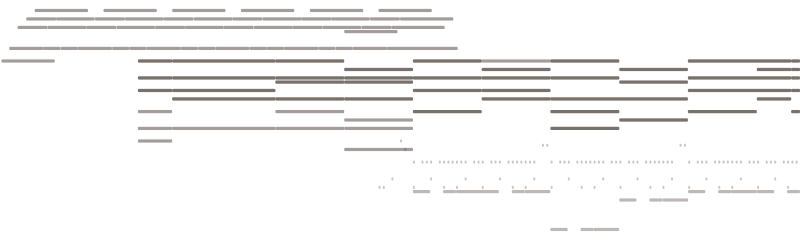
Giai điệu giọng hát → MIDI
4 track · 387 nốt
Âm thanh gốc
0–30s
Bạn nhận được gì
Công cụ chuyển MP3 sang MIDI cho ra nốt nhạc thật
Nốt nhạc có nhịp và velocity thật
Mỗi nốt mang cao độ, thời điểm bắt đầu và kết thúc tính bằng giây, cùng một velocity. Đó là khác biệt giữa một file MIDI thực sự dùng được và một dãy khối đều nhau vô hồn.
Every detected note carries four values — that is what makes it editable.
Tách trước khi ghi bản nhạc
Giọng hát và nhạc đệm được tách ra trước, nên giai điệu chính không bị hợp âm lấn át. Bạn nhận một file MIDI cho mỗi phần, thay vì một bản gộp lộn xộn của cả bản phối.
Separating first is why the transcription is clean: each part is read on its own instead of as one blurred mix.
Một file .mid chuẩn
Standard MIDI File định dạng 1, 480 tick mỗi nốt đen, có ghi sẵn tempo và tên track. Không đóng gói độc quyền, không cần tài khoản để mở.
Mở được ở mọi nơi
MIDI là định dạng ổn định từ năm 1983. File này chạy trên mọi DAW, mọi phần mềm chép nhạc, và bất kỳ đàn phím nào có cổng MIDI — kể cả phần mềm sẽ được viết ra hàng chục năm sau.
Ai dùng công cụ này
Khi bạn cần nốt nhạc, không phải bản ghi âm
Học một đoạn nhạc bằng tai
Biến đoạn solo bạn không bắt kịp thành piano roll có thể làm chậm, lặp lại và đọc từng nốt một.
Dựng lại một bản demo
Bạn ghi âm ý tưởng bằng điện thoại. Lấy các nốt nhạc ra và dựng lại đàng hoàng với âm thanh bạn thực sự muốn.
Đổi tông hoặc tempo
Đổi tông một bản ghi âm làm giảm chất lượng. Đổi tông MIDI thì chính xác tuyệt đối — phần hòa âm giữ nguyên và không gì bị kéo giãn.
Chép ra bản nhạc giấy
Nhập MIDI vào phần mềm chép nhạc và bạn đã đi được phần lớn chặng đường tới một bản nhạc in được.
Đổi nhạc cụ
Cùng những nốt đó, do bất cứ nhạc cụ nào chơi. Chuyển đoạn guitar sang dàn dây, hay giai điệu giọng hát sang synth lead.
Nghiên cứu một bản phối khí
Nhìn thấy cách rải hợp âm và tiết tấu bày ra trên lưới nói cho bạn những điều nghe không bao giờ cho thấy.
Câu hỏi thường gặp
Câu hỏi về chuyển MP3 sang MIDI

Lấy nốt nhạc ra từ âm thanh của bạn
Tải một bản nhạc lên và tải về file MIDI có thể chỉnh sửa.