MP3 ke MIDI: ubah audio jadi not yang bisa diedit
Unggah file audio apa pun dan dapatkan .mid standar — setiap not lengkap dengan nada, waktu mulai, waktu selesai, dan velocity, siap ditarik ke Ableton, FL Studio, atau Logic.
Cara kerjanya
Ini transkripsi, bukan ganti format
Mengubah MP3 ke MIDI bukan konversi file biasa. MP3 adalah rekaman — satu gelombang audio yang memuat semua instrumen sekaligus. File MIDI sama sekali tidak menyimpan suara: isinya cuma daftar instruksi, not mana yang mulai kapan, berapa lama, dan seberapa keras dimainkan. Berpindah dari satu ke yang lain berarti mendengarkan audio dan menebak apa yang dimainkan — itulah transkripsi.
Itu sebabnya konverter biasa tidak bisa melakukannya. Pipeline kami memisahkan file yang diunggah jadi beberapa bagian dulu, lalu membaca tiap bagian sendiri-sendiri dan menuliskan not yang ditemukan. Hasilnya Standard MIDI File asli — bukan file audio dengan ekstensi lain.
Setelah jadi MIDI, kamu bisa melakukan hal yang mustahil dilakukan pada rekaman biasa: ganti nada dasar tanpa artefak, ganti piano jadi string section, perbaiki satu not yang salah, quantize timing, atau cetak partnya jadi partitur.

Cara kerja
Cara mengonversi MP3 ke MIDI
Sebagian besar lagu selesai dalam sekitar satu setengah menit.
- 1
Unggah audio kamu
MP3, WAV, FLAC, atau M4A hingga 20MB. Lagu, memo suara, rekaman piano dari HP — apa pun asal melodinya masih bisa dikenali.
- 2
Kami pisahkan dulu, baru transkrip
Trek dipecah jadi beberapa bagian, dan tiap bagian dianalisis nada dan timing-nya secara terpisah. Membaca bagian yang bersih, bukan mix lengkap, itulah yang membuat hasilnya bisa dipakai.
- 3
Unduh file .mid
Kamu dapat satu Standard MIDI File per bagian. Buka di DAW, software notasi, atau sequencer hardware.
Lihat dan dengar
Seperti apa file MIDI itu
Tiga puluh detik pertama sebuah lagu, ditranskrip. Piano roll menampilkan setiap not yang terdeteksi berdasarkan nada dan waktu; waveform di bawahnya adalah audio asalnya, pada sumbu waktu yang sama.
Bagian instrumental → MIDI
5 trek · 2,693 not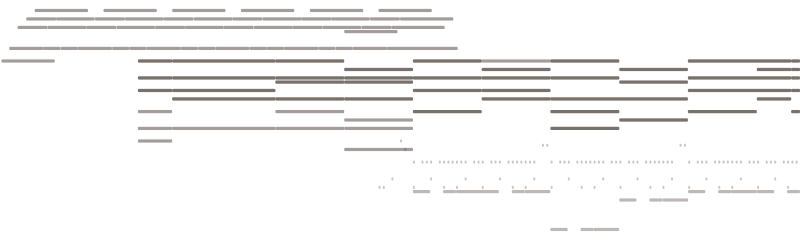
Baris vokal → MIDI
4 trek · 387 not
Audio asli
0–30s
Yang kamu dapat
Konverter MP3 ke MIDI yang menghasilkan not sungguhan
Not dengan timing dan velocity nyata
Setiap not punya nada, waktu mulai dan selesai dalam detik, dan velocity. Itulah beda antara file MIDI yang benar-benar bisa digarap dan sekadar grid blok berdurasi sama.
Every detected note carries four values — that is what makes it editable.
Dipisah dulu sebelum ditranskrip
Vokal dan instrumental dipisah lebih dulu, jadi garis melodi tidak berebut perhatian dengan chord. Kamu dapat satu file MIDI per bagian, bukan satu file campur aduk dari keseluruhan mix.
Separating first is why the transcription is clean: each part is read on its own instead of as one blurred mix.
File .mid standar
Format 1 Standard MIDI File, 480 tick per not seperempat, lengkap dengan tempo dan nama trek. Tanpa wrapper proprietary, tanpa perlu akun untuk membukanya.
Bisa dibuka di mana saja
MIDI sudah jadi format yang stabil sejak 1983. File ini jalan di semua DAW, semua software notasi, dan keyboard apa pun dengan input MIDI — termasuk software yang baru akan ditulis puluhan tahun lagi.
Siapa yang pakai
Saat kamu butuh notnya, bukan rekamannya
Belajar bagian lagu dengan telinga
Ubah solo yang susah kamu tangkap jadi piano roll yang bisa diperlambat, diulang-ulang, dan dibaca not demi not.
Membangun ulang demo
Kamu rekam ide di HP. Ambil notnya dan bangun ulang dengan sound yang benar-benar kamu mau.
Ganti nada dasar atau tempo
Transpose rekaman biasa merusak kualitasnya. Transpose MIDI presisi — aransemen tetap utuh dan tidak ada yang melar.
Menulis partitur
Impor MIDI ke software notasi dan kamu hampir sampai di partitur siap cetak.
Ganti instrumen
Not yang sama, dimainkan oleh apa saja. Pindahkan garis gitar ke string, atau melodi vokal ke synth lead.
Mempelajari aransemen
Melihat voicing chord dan ritme tersusun di grid kasih tahu hal-hal yang tidak akan kamu tangkap cuma dengan mendengarkan.
FAQ
Pertanyaan seputar MP3 ke MIDI

Keluarkan not dari audio kamu
Unggah trek dan unduh file MIDI yang bisa diedit.