How to Make a Suno Song Longer: Extend, Fix Cut-Offs, Go Past 8 Min
Match the fix to the symptom, set the extend point so the join is clean, and see what each step costs in credits. Plus a route that spends no Suno credits.
Suno's answer to a short song is the Extend tool: open the song's three-dot menu, choose Remix/Edit, then Extend, drag the white arrow to the second you want to continue from, and hit Create. One more click, Get Whole Song, stitches the new part onto the original and costs nothing.
That is the happy path. It does not cover the three reasons people actually search this: the song stopped before the lyrics ended, Extend produced something that sounds like a different track, or you need more than one generation can hold. Each needs a different fix, and only one of them is Extend.
Which fix do you need?
Most wasted credits come from using Extend when Crop or a better original prompt was the right tool.
| What happened | Use this | Why |
|---|---|---|
| Song ended before the last verse or chorus | Extend from 5 to 10 seconds before the cut, paste the missing lyrics | Rewrites the broken ending instead of the whole song |
| Song is complete but too short for what you want | Extend from the end with a new section brief | Adds a bridge, solo or outro to a finished track |
| Song is too short every time you generate | Fix the original prompt: shorter instrumental tags, fewer style words, the Duration control | Fixes the cause, so you stop extending at all |
| Ending repeats or loops instead of stopping | Crop (Pro/Premier), then optionally a fade | The song is already long enough; it needs cutting, not adding |
| A middle section is wrong | Replace Section (Pro/Premier) | Extend only touches audio after the cut point |
| You need more than one generation can hold | Extend in chained passes, or an outside extender | See "Can Suno make a song longer than 4 minutes?" and the Rewave section |
How to extend a song in Suno
Extend keeps everything before your chosen timestamp and generates new audio after it. Steps 1, 2, 3, 6 and 7 are Suno's own, from its help article How do I make my song longer?. Steps 4 and 5 are the parts that article skips and most failed extends come down to.
- Find the song in your Library or on the Create page.
- Open the three-dot menu to the right of the title, choose Remix/Edit, then Extend.
- Drag the white arrow in the extend window to the point you want to continue from. Play the song and stop it on a natural boundary: the end of a bar, the end of a sung phrase, or a pause after a chorus. Cutting in the middle of a word is the most common cause of a garbled join. A reverb tail still ringing at the cut point does the same, so move the arrow a second earlier.
- Clear the lyrics box and write only the new section. In practice, lyrics left in the box get sung again. Start with a section tag such as
[Bridge]or[Outro]so the model knows what kind of section it is writing. - Set the style field only if you want the new part to change direction. Leaving it blank usually keeps the direction of the original. Style text works best in English even when the lyrics are not.
- Hit Create. You get two continuations. Suno labels each one "Part 2" and keeps the original untouched.
- Stitch it: open the three-dot menu on the Part 2 you like, hover Create, and choose Get Whole Song. Listen to the full stitched file, not just the new part. The join is where problems hide.
Keep the new-section brief short. [Outro] slow down, strings only, end on a held chord beats a paragraph.
Fix a song that cut off before the lyrics ended
Extend from a few seconds before the cut and paste the rest of the lyrics. That repairs the ending without regenerating the whole track.
- Note the timestamp where the vocal stops, then set the extend point 5 to 10 seconds earlier, on the last clean phrase.
- In the lyrics box, paste only the lines that never got sung, starting from the first missing line.
- Close with
[Outro]and[End](next section).
If the same song keeps cutting off on every generation, the prompt is the problem, not Extend. Songs run out of room when the lyrics and structure ask for more audio than the model budgets for. Three things fix that:
- Trim instrumental tags. A
[Guitar Solo: 16 bars]or a long[Instrumental Break]spends time that the lyrics needed. Cut them to a few bars or drop them. - Use two or three style descriptors, not six. Complex arrangements make the model spend longer per section.
- Stay near 3,000 characters of lyrics. Current models accept 5,000 per HookGenius's limits table, but songs start rushing or truncating well before the cap.
Give the song a real ending
Songs that stop dead usually had no ending written into them. Three tags fix that.
[Chorus]
...your final chorus...
[Outro]
one or two closing lines, or an instrumental description
[End]
[Outro] gives the model a section to wind down in. [End] signals it to stop. Keep the outro short, around 15 to 25 seconds of material, because longer outros are where the model drifts or starts repeating the chorus again. [Fade Out] on its own is unreliable, but [Outro] [Instrumental Fade Out] [End] works well on loop-based genres like lo-fi and ambient.
These are community conventions rather than documented switches, so expect some variance between takes.
If the song already has a good ending and then keeps going, do not extend and do not regenerate. On Pro or Premier, use Crop Song from the same Remix/Edit menu, put the end point right after the last note's tail, and add a fade only if the cut feels abrupt. On the free plan, or if you have already downloaded the MP3, a free audio cutter does the same trim in the browser.
When Suno Extend is not working
Four causes cover almost every "Extend not working" report.
The extension ends immediately or sounds cut off. Move the extend point one to three seconds earlier. An extend point placed on top of a transient or mid-word gives the model nothing clean to continue from.
The new part sounds like a different song. Extend only reads the last few seconds before the cut. If those seconds are a breakdown or a silent gap, the model has little to match. Extend from a point where the full arrangement is playing, and leave the style field empty so the model copies what it hears instead of following a new description.
The original lyrics get sung again. The lyrics box was not cleared (step 4 above).
Generation fails or hangs. Simplify the prompt to a single section tag and a one-line style, then try another model in the dropdown. Since the v6 launch on 9 September 2026 the picker offers v6, v6-wild and v6-mini, and switching between them is the usual workaround when one misbehaves.
Persona and Cover outputs have historically carried extra restrictions on Extend. If the song came from one of those, try extending a plain generation of the same prompt to rule that out.
Can Suno make a song longer than 4 minutes? Or 8?
Yes on both counts, with different methods. Every model since V4.5 generates up to 8 minutes in a single run, per Suno's v4.5 announcement, so the old 4-minute ceiling is gone. Past 8 minutes, Extend is the only route inside Suno.

Suno's Create form. The Duration control lives behind the Advanced toggle once you are signed in.
For a long song in one shot, open More Options on the Create form and set Duration to Custom instead of Auto. It is a target, not a guarantee. Your lyrics, tempo and instrumental sections still decide how the time gets used, so plan sections that fill the length you ask for. The V5.5 slider that preceded this control topped out at 6 minutes, and the current cap is not documented, so check the control's maximum before you write an 8-minute lyric sheet.
Each Extend adds one section, not a whole song. To go past 8 minutes, chain them: extend from the end, Get Whole Song, extend the stitched result again. Suno documents no limit on how many times you can do this.
Quality is the limit. Each pass reads only the tail of the previous one, so after three or four extensions the song has usually drifted in energy or key. Cut long tracks into movements with a clear, short section brief at each extend point rather than hoping one instruction carries eight minutes.
What extending costs in Suno credits
Every Extend is billed like a fresh generation. Suno's help centre states only that a generation costs 10 credits and returns two clips. The per-action figures below come from community tables such as sunnoai's credits breakdown and match what users report being deducted.
| Action | Credits |
|---|---|
| Create (two versions) | 10 |
| Extend (two continuations) | 10, community-reported |
| Replace Section (Pro/Premier) | 10, community-reported |
| Get Whole Song | 0 |
| Crop (Pro/Premier) | 0 |
On the free plan's 50 daily credits, that is five Extend attempts a day, and stitching is free. A song that needs three passes plus a retry or two uses the whole allowance.
Extend a Suno song without spending Suno credits
The other route is to download the MP3 and extend it in a standalone tool. The question of whether you can upload your own recording in the first place has its own guide. The Rewave AI Music Extender takes any uploaded track, continues it from the second you choose, and returns two continuations per run. New accounts get enough credits for a first run. After that it is pay-per-run on Rewave's own credits, so the saving is on the Suno side, not zero cost.
One caveat first. Since 3 September 2026 Suno caps downloads by plan: free accounts that joined earlier get 7 trial downloads in total, Pro gets 20 a month and Premier 60. This route spends a download rather than credits, which matters if you are on the free plan.
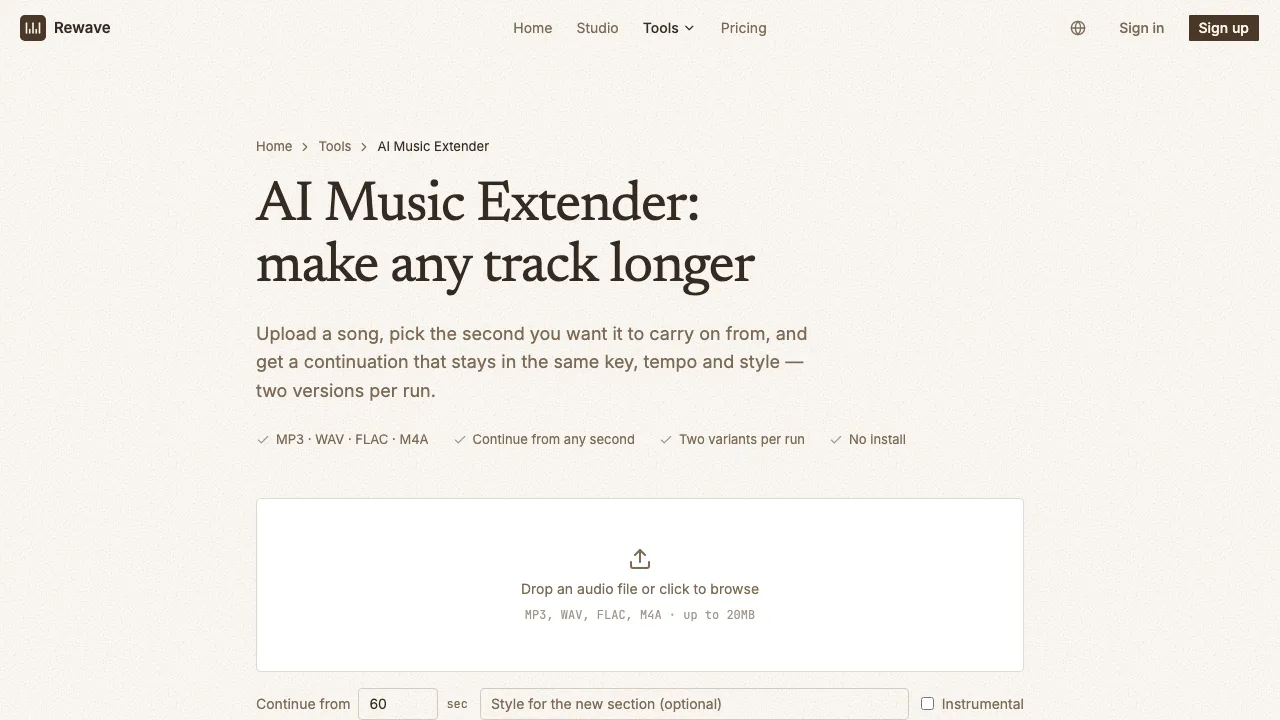
The Rewave extender page. The "Continue from" field is the extend point in seconds; audio before it is kept, audio after it is rewritten.
How it maps onto the Suno workflow:
- Extend point is a number of seconds instead of a draggable arrow. Set it to the track length to continue from the end, or earlier to rewrite a bad ending.
- Style field is optional. Empty means "match what you hear". Filling it in steers the new section the same way Suno's style box does.
- Instrumental toggle keeps a continuation vocal-free.
- Formats: MP3, WAV, FLAC, M4A, AAC and OGG up to 20 MB. Runs take three to four minutes, and each run adds a section rather than a fixed number of seconds. Extend the result again if you need more, or line up several exports in an audio joiner if you are assembling movements by hand.
The continuation is generated by Suno's V6 models through an API provider, so it is the same model family that made your track, not a different engine trying to imitate it.
The real trade-off is context. We work from the rendered file you upload and nothing else, while Suno extending a clip you generated inside Suno still has that generation to refer to. For a lead vocal continuing mid-verse, that extra context usually keeps the timbre closer, so do those repairs in Suno.
FAQ
Why does my extended song have two files?
Suno keeps the original and the "Part 2" extension as separate clips until you run Get Whole Song. That is deliberate: you can audition both continuations and extend again from either before committing to a stitched file.
Can I extend an uploaded song, not one Suno generated?
Yes. Upload the audio from the Create page, find it in your Library labelled "Uploaded", and choose Extend from its menu. Upload length is capped by plan, and you must confirm you own the material before generating. Extending someone else's recording creates a derivative work.
Can I extend from the middle of a song instead of the end?
Extend always rewrites everything after the point you choose, so extending from the middle throws away the second half. To change a middle section and keep the ending, use Replace Section on Pro or Premier. On the free plan, extend from the middle and rebuild the rest with the original lyrics pasted back in.
