Can You Upload Your Own Song to Suno and Extend It?
Yes, with limits. Here is the upload and extend workflow, the plan caps Suno's own pages disagree on, and what to do when it says your audio matches an existing work of art.
Yes. Suno lets you upload your own audio and continue it with Extend. The upload button sits next to Create on the Create page, the file lands in your Library labelled "Uploaded", and Extend works on it the same way it works on a generated track.
Two things get in the way. Upload length is capped by plan, and Suno's copyright filter rejects a lot of audio that its owner has every right to use.
How to upload a song and extend it
- Open the Create page and find the audio upload button beside the Create button.
- Add a file or record one. You have to tick the box confirming you own the material before Suno will accept it.
- Find it in your Library, where it appears labelled "Uploaded".
- Open the triple-dot menu on the clip, choose Remix/Edit, then scroll to Extend. Set the style, the title, and the point you want the continuation to start from.
- Generate. Your upload stays untouched as the original clip and keeps its place at the front of the track. The continuation arrives tagged "Part 2".
- Stitch it. Open the triple-dot menu on the Part 2 you like, hover Create, and choose Get Whole Song.
The continuation follows what it hears in your upload. Leave the style field empty and it matches the arrangement; fill it in to steer the new section somewhere else. For the extend point mechanics and how to keep the join clean, see how to make a Suno song longer.
How long an upload can be
Suno's own pages disagree, so check the limit in the app before you trim a file.
| Source | Free | Pro | Premier |
|---|---|---|---|
| Audio Uploads help article, edited May 2025 | 60 seconds | 8 minutes | 8 minutes |
| Pricing page, live September 2026 | 8 minutes | 30 minutes | 30 minutes |
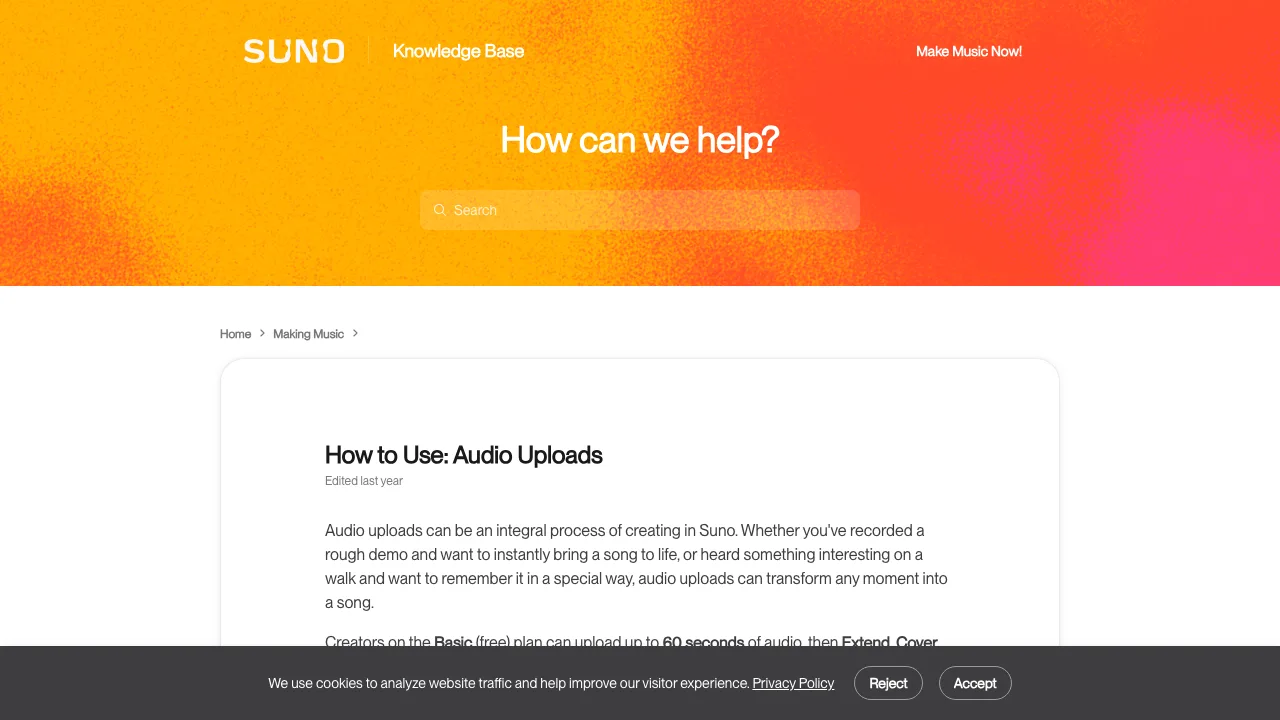
Suno's Audio Uploads help article, checked 15 September 2026. It puts the free plan at 60 seconds, while the pricing page says 8 minutes.
The Upload Audio article, last edited in March 2025, adds a third figure for recording straight into the browser: 6 to 60 seconds, or up to 120 seconds on Pro and Premier.
The pricing page carries the newest numbers and the help articles are more than a year old, which is the likely reason they disagree. Assume the lower figure and test upward. If your demo is longer than the cap, cut the section you actually want continued and upload only that. A browser audio cutter does it without installing anything.
"Uploaded audio matches existing work of art"
Users report two rejection messages, quoted here. Suno does not document either one.
Uploaded audio matches existing work of art. Please upload a different audio file.
Uploaded audio contains copyrighted lyrics.
Neither means Suno has judged you a thief. It means a fingerprint matched, or a speech-to-text pass found lyrics that exist somewhere else. The filter grew stricter through late 2025 and 2026 as Suno settled with Warner Music and moved to licensed models, and it errs on the side of blocking. A platform block and legal ownership are separate things.
Why your own music gets flagged
These are the causes that come up most often in the two fullest write-ups, from aimusickit and Jack Righteous:
- The track is already published. Anything on Spotify, YouTube or SoundCloud is in the fingerprint databases, including your own releases.
- It contains third-party material. Leased beats, sample packs and loop libraries are non-exclusive, so somebody else's upload already registered them.
- A melody resembles something. Close intervals and common chord movements are enough on a conservative threshold.
- Background audio got captured. A TV in the room, a reference track bleeding into a phone recording, a producer tag.
- The lyrics exist elsewhere. Common phrases and idioms match across songs, and your own published lyrics count too.
- Nothing identifiable. Both write-ups report blocks on humming, sketches and material with no plausible match at all.
Users also report that a Suno track downloaded, edited in a DAW and uploaded back can come back flagged against Suno's own catalogue. Suno does not document that behaviour.
Guides online tell you to pitch-shift or slow the file until the match stops. Do not do that. It beats a detector rather than proving a right, and it leaves you with a detuned master. On audio you do not own it is plain infringement, caught or not. If the audio is yours, support can clear it. If it is not, the filter is doing its job.
What to do about it
- Screenshot the error with the date and which feature you were using. You will need it if you contact support.
- Make a clean test excerpt. Take 20 to 30 seconds of the track containing only material you made yourself, and upload that.
- Change one thing at a time. If the clean excerpt passes and the full track fails, add elements back until it fails again. That tells you what triggered it.
- Strip the suspect layer. If a leased beat or a sampled loop is the cause, a stem splitter lets you pull your own vocal or melody out and upload that alone.
- Email support@suno.com with the screenshot, your account email and your rights documentation. That is the only official channel; Discord is not.
Getting your Suno track out costs a download
If your plan is to export a Suno song and re-upload it, budget for the export. Since 3 September 2026 Suno caps downloads by plan. Free accounts opened before that date got up to 7 trial downloads for life, with no commercial rights; accounts opened after it only "may occasionally receive" them. Pro gets 20 a month and Premier 60, and unused monthly downloads do not roll over.
Two exemptions are worth knowing. Suno Studio workflows fall outside the download limits, and stems count inside their parent song's single download rather than separately. The download only becomes necessary when you want the audio somewhere else.
Extending an upload outside Suno
The Rewave AI Music Extender takes an uploaded track and continues it from any second you name. Files can be MP3, WAV, FLAC, M4A, AAC or OGG, the limit is file size rather than minutes by plan, and a run returns two continuations in three to four minutes.
What it does not do is dodge Suno's filter. Our extender runs on Suno's V6 models through an API provider, so audio that Suno's own upload check rejects can be rejected here too. We do not run a separate copyright match of our own, and that is the only claim we can make honestly. What you save is Suno credits and a download from your monthly allowance, not the rights question.
Extending a recording you do not have rights to creates a derivative of it, and releasing or monetising that still needs permission from whoever owns the original. If you made the recording, none of that applies to you.
FAQ
Can someone else upload my Suno song to their own account?
Anyone holding the file can try, and the ownership tick box is not verified. In practice it often fails the fingerprint check against Suno's own catalogue. Who owns the song is set by your plan's terms at the time you made it, not by who uploads the file.
Can I upload an instrumental and have Suno sing over it?
Suno's pricing page lists "add new vocals or instrumentals to existing songs" as a Premier feature, so check your plan first. A commercially released instrumental will usually be rejected by the upload filter anyway, and using one without a licence is a rights problem regardless of what the filter does.
Where does my uploaded audio go?
It sits in your Library as a clip you can build on later, labelled "Uploaded". Delete the clip to remove it from your library. Suno does not document what happens to the file after that.
Why does Suno say my file will not upload at all?
That is usually format or length, not the copyright filter. Check the file is a common audio format and inside your plan's minute cap, then try a shorter excerpt before assuming a block.
