MP3 to MIDI: convert audio into editable notes
Drop in any audio file and get a standard .mid back — every note with its pitch, start, end and velocity, ready to drag into Ableton, FL Studio or Logic.
What it does
A transcription, not a format change
Converting MP3 to MIDI is not a file conversion. An MP3 is a recording — a single waveform holding every instrument at once. A MIDI file holds no sound at all: it is a list of instructions saying which note starts when, how long it lasts and how hard it was played. Going from one to the other means listening to the audio and working out what was played, which is transcription.
That is why a plain converter cannot do it. Our pipeline separates your upload into its parts first, then reads each part on its own and writes out the notes it finds. You get a real Standard MIDI File — not an audio file with a different extension.
Once it is MIDI you can do things that are impossible with a recording: change the key without artefacts, swap the piano for a string section, fix one wrong note, quantise the timing, or print the part as sheet music.

How it works
How to convert MP3 to MIDI
Most tracks are done in about a minute and a half.
- 1
Upload your audio
MP3, WAV, FLAC or M4A up to 20MB. A song, a voice memo, a phone recording of a piano — anything with a discernible melody.
- 2
We separate, then transcribe
The track is split into its parts, and each part is analysed for note pitch and timing independently. Reading a clean part instead of a full mix is what keeps the result usable.
- 3
Download the .mid
You get a Standard MIDI File per part. Open it in your DAW, in notation software, or on a hardware sequencer.
See and hear it
What a MIDI file looks like
The first thirty seconds of a song, transcribed. The piano rolls show every detected note by pitch and time; the waveform underneath is the audio they came from, on the same time axis.
Instrumental part → MIDI
5 tracks · 2,693 notes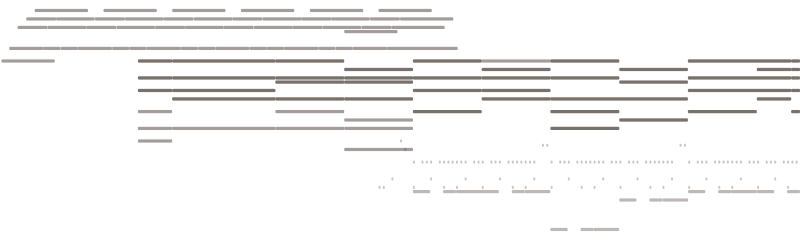
Vocal line → MIDI
4 tracks · 387 notes
The original audio
0–30s
What you get
An MP3 to MIDI converter that outputs real notes
Notes with real timing and velocity
Every note carries pitch, a start and end time in seconds, and a velocity. That is the difference between a MIDI file you can actually work with and a flat grid of equal-length blocks.
Every detected note carries four values — that is what makes it editable.
Separated before transcribed
Vocals and instrumental are pulled apart first, so the melody line is not fighting the chords for attention. You get a MIDI file per part rather than one muddled take on the whole mix.
Separating first is why the transcription is clean: each part is read on its own instead of as one blurred mix.
A standard .mid file
Format 1 Standard MIDI File at 480 ticks per quarter note, with tempo and track names written in. No proprietary wrapper, no account needed to open it.
Opens anywhere
MIDI has been a stable format since 1983. The file works in every DAW, every notation app, and any keyboard with a MIDI input — including software written decades from now.
Who uses it
When you need the notes, not the recording
Learning a part by ear
Turn the solo you cannot quite catch into a piano roll you can slow down, loop and read note by note.
Rebuilding a demo
You recorded an idea on your phone. Get the notes out and rebuild it properly with the sounds you actually wanted.
Changing key or tempo
Transposing a recording degrades it. Transposing MIDI is exact — the arrangement stays intact and nothing is stretched.
Writing out sheet music
Import the MIDI into notation software and you are most of the way to a printable score.
Swapping instruments
The same notes, played by anything. Move a guitar line to strings, or a vocal melody to a synth lead.
Studying an arrangement
Seeing the chord voicings and rhythms laid out on a grid tells you things listening never will.
FAQ
MP3 to MIDI questions

Get the notes out of your audio
Upload a track and download an editable MIDI file.